
|
Wincatalog 2026.1.0.415
 Release Name: WinCatalog 2026.1.0.415 Size: 120.6 MB 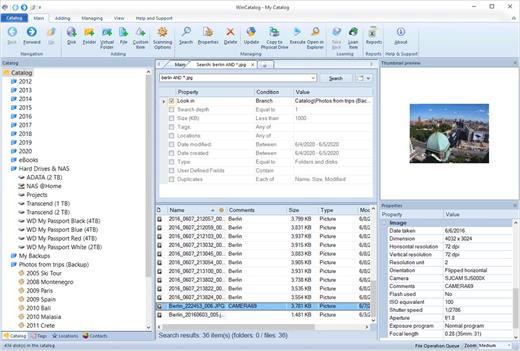 Organize your file catalog, using virtual folders, tags (categories) and user defined fields, and find files in seconds, using powerful search, even when disks are not connected to the computer. Also easily use WinCatalog as a duplicate file finder. Your disk catalog can be automatically updated through Windows task scheduler. And no matter how huge your collection of disks is - you will always have your file catalog on hand, perfectly organized. Main features of WinCatalog Disk Catalog Software: Ability to extract and store in a catalog thumbnails of graphic files (photos, pictures, RAW-images), as well as EXIF data of digital photos. Thanks to WinCatalog 2024 disk catalog software you can automatically create and store thumbnails of graphic files (images, photos) saved in all popular formats (JPEG, PNG, BMP, ICO, GIF, Tiff, WMF, and EMF) or RAW image formats produced by most of modern digital photo cameras. You can also save EXIF data (comments, resolution, [photo camera model, focal distance, and other parameters) for photos. This means you can preview picture thumbnails in the catalog without the need to open the particular media. And it will allow you to quickly and easily locate a photo or an image in your image and photo catalog! Fluently scan inside Zip, RAR, and 7z archives as well as ISO disk images, and add them as folders into the catalog The program supports Zip, Zipx, RAR/RAR5, and 7z compressed files as well as ISO and NRG disk images. Files inside archives are displayed as files in folders. Automatically extract supplemental information from music, video, Office Documents, PDF, HTML, TXT files during scanning a disk and creating a catalog WinCatalog 2024 can display ID3 tags including artist name, song, album, disk cover and other information for music files in the following formats: MP3, WAV, WMA, OGG, OGA, ASF, M4A, M4B, M4P and MP4. For video files WinCatalog extracts and adds to video catalog basic information including thumbnail, codec, video frame resolution, audio tracks information, etc. So you can successfully use WinCatalog as a video catalog software. For E-books WinCatalog extracts a title, a description, authors' names, and a cover image. The supported formats of e-books are Epub, Mobi, and FB2. For HTML files WinCatalog extracts and stores headings and tags. For text files WinCatalog extracts a part of text and creates a preview that is displayed when you search for a particular document. For PDF files WinCatalog creates a thumbnail for the first page and grabs text (if any) making them searchable by content. For Office document files (Word, Excel, PowerPoint, OpenOffice, Markdown) WinCatalog creates a thumbnail for the first page and grabs text and document attributes making them searchable by content. |
| Часовой пояс GMT +3, время: 22:33. |
vBulletin® Version 3.6.8.
Copyright ©2000 - 2026, Jelsoft Enterprises Ltd.
Перевод: zCarot