
|
Lazesoft Recover My Password 5.1.1.1 Professional / Server / Unlimited Edition
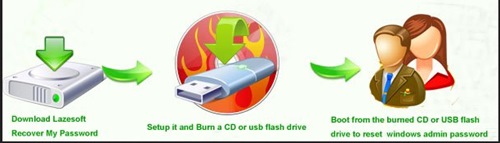 Lazesoft Recover My Password 5.1.1.1 Professional / Server / Unlimited Edition File size: 250 MB (in Total) Setup it and burn Lazesoft Recover My Password CD or USB flash drive, then boot from it. With just a few mouse clicks you can reset your administrator's password to blank, then you can log in your administrator account with a blank password. If you have forgotten Administrator's password, or the Administrator's user account has been locked out or disabled, you cannot gain access to the account. However you can burn a Lazesoft Recover My Password cd or USB flash drive and boot from it to clear Administrator's password and unlock the user account. Lazesoft Recover My Password Features - Easy to install and use with a very handy and clear user interface. - Resets passwords with a bootable CD. - Resets passwords with a bootable USB drive. - Resets local Administrator password. - Resets Domain Administrator password. - Retrieve product keys from unbootable Windows installations - WinPE Recovery CD Builder - Automatically detects several operating systems installed on the computer. - Unlocks and Enables user accounts. - Disables the password expiry option. - Supports Windows XP, Vista, Windows 7, Windows 8.1, Windows 10. - Supports Windows 2003, 2008, 2008 R2, 2012, 2012 R2, 2016, 2019 (For Server Edition) - Works on all laptops including Legend, Toshiba, Dell, IBM etc. - Supports 32-bit and 64-bit Windows. - Support WinPE USB boot disk. - Support building bootable DVD - Change the old password to the one entered - Convert Microsoft live id account to local account - Supports Windows 10, version 20H2 - Find lost password of Windows user account - Options to special WinPE version and type while building boot disk - Options to special custom drivers while building boot disk - Supports UEFI boot mode and BIOS boot mode - Enhanced guides for resetting Windows Live ID user account password - Recover Windows 10/8.1 OEM product key from BIOS - Start Menu on boot disk Supported Windows Versions - Windows XP - Windows 2003 - Windows Vista - Windows 2008 - Windows 7 - Windows 2008 R2 - Windows 8 - Windows 2012 - Windows 8.1 - Windows 2012 R2 - Windows 10 - Windows 2016 - Windows 2019 Supported Hard Disks - IDE - SCSI - SATA - 1394 - USB - SAS - mSATA - M.2 - PCIe - RAID Drivers Supported File Systems Type - FAT - FAT32 - NTFS Supported Disks - Basic Disk - GPT Disk - Dynamic Disk System Requirements: Windows 7/8/10/11 |
| Часовой пояс GMT +3, время: 20:46. |
vBulletin® Version 3.6.8.
Copyright ©2000 - 2026, Jelsoft Enterprises Ltd.
Перевод: zCarot