
|
Procreate Masterclass: The Realistic Pouf Texture
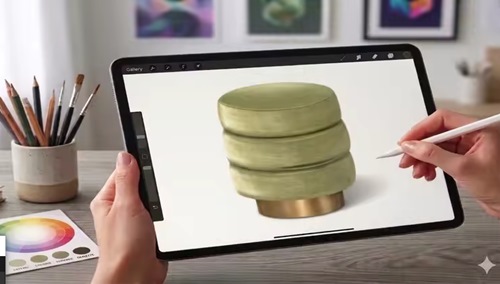 Procreate Masterclass: The Realistic Pouf Texture Published 5/2026 MP4 | Video: h264, 1920x1080 | Audio: AAC, 44.1 KHz, 2 Ch Language: English | Duration: 33m | Size: 775.76 MB What you'll learn Master the art of rendering realistic fabric textures in Procreate Understand light and shadow to create 3D volume for furniture sketching Learn how to use custom brushes and color palettes to speed up your workflow Create professional interior design illustrations from scratch to final polish Requirements An iPad and the Procreate App installed An Apple Pencil (or a compatible stylus) for pressure-sensitive detailin Basic knowledge of the Procreate interface (brushes, layers, and colors) No advanced drawing skills required - I will guide you step-by-step! Description This course contains the use of artificial intelligence. Welcome to this step-by-step Procreate masterclass where you will learn how to draw a realistic velvet pouf from scratch - covering everything from the initial construction sketch to the final metallic base and projected shadow. This course is designed for interior designers, architects, and digital artists who want to improve their furniture rendering skills in Procreate and achieve professional, elegant results. Starting from a blank canvas, you will follow a structured process that covers every stage of the illustration - canvas setup, symmetry tools, base color application, soft fabric texture, volume, highlights, light control, and final refinements. Every single step includes exact brush names, size settings, opacity values, and hex color codes - so you never have to guess. You will learn how to use the 2B Compressed brush to create a realistic velvet fabric effect, how to build volume and depth using Clipping Masks and layering techniques, and how to apply soft highlights that make the illustration feel truly three-dimensional. The course also covers how to render a metallic golden base with reflections and warm tones, and how to create a realistic projected shadow that grounds the object on the surface. What makes this course unique is the level of detail provided at every step. This is not just a drawing tutorial - it is a complete rendering system that teaches you how to think and work like a professional interior design illustrator. The techniques you will learn here can be applied to any upholstered furniture - sofas, armchairs, ottomans and more. Once you understand the principles of light, shadow, texture and material, you can render any object with confidence. All you need is an iPad with Procreate installed and a basic knowledge of the app. Everything else will be taught inside the course. Join me and start creating professional interior design illustrations today! Who this course is for Interior designers and architects who want to enhance their digital sketching Design students looking to create more realistic portfolio presentations Digital artists who want to master furniture and fabric rendering Beginners in Procreate who want to learn a professional rendering workflow |
| Часовой пояс GMT +3, время: 03:06. |
vBulletin® Version 3.6.8.
Copyright ©2000 - 2026, Jelsoft Enterprises Ltd.
Перевод: zCarot