
|
Vovsoft Watermark Image 2.1
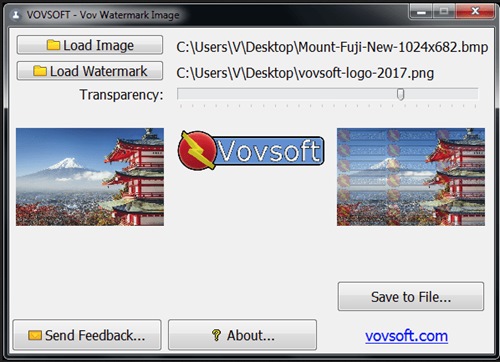 Vovsoft Watermark Image 2.1 File size: 6.0 MB Vov Watermark Image gets installed quickly and without any issues. As far as the interface goes, the utility has a single window that shows all options available. By clicking two buttons, you can separately load the base image and the watermark picture. Both can be previewed in this panel, along with the new photo. Furthermore, you can tweak the level of watermark transparency while keeping an eye on the new photo preview, thanks to the fact that changes are reflected in real time. When you're pleased with the result, you can save the new photo by specifying an output directory, filename and format. Worth noting is that Vov Watermark Image acts as a graphic converter too since it can create photos with different filetypes than the originals. As far as file format is concerned, it works well with PNG (with or without transparency), JPG, BMP, ICO, EMF, WMF, TIF or TIFF. System Requirements: Windows 11, Windows 10, Windows 8/8.1, Windows 7, Windows Vista, Windows XP (32-bit & 64-bit) |
| Часовой пояс GMT +3, время: 22:06. |
vBulletin® Version 3.6.8.
Copyright ©2000 - 2026, Jelsoft Enterprises Ltd.
Перевод: zCarot