
|
Finalmesh Professional 6.5.0.711
 Release Name: FinalMesh Professional 6.5.0.711 Size: 16.7 MB 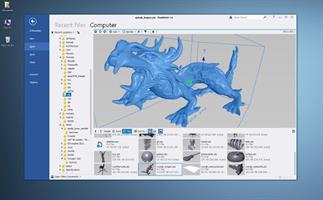 3D Viewer View your 3D files, textures, inspect the internals of 3D objects and all this in a modern and fast UI. Per pixel lighting Custom render modes View any node in a new window Hierarchy tree List of materials Converter Convert 3D model or make final adjustments, save to another file format or render to image file. Just as an example, Collada can be a good choice for your game engine, while STL file is good format for a 3D printer. Publisher Convert and publish 3D models to Adobe PDF document or create HTML application with 3D WebGL content. It is easy to share your 3D data with clients, friends or colleagues over the Internet. Convert to single 3D PDF document. Create about WebGL application in few mouse clicks. Both methods are great, powerful and easy to use in FinalMesh. PDF publishing platform integrated into FinalMesh allows to convert sophisticated technical data, 3D models into regular, well known PDF files. It is easy to select best initial view, render mode, lighting right in PDF Publish mode, all changes are visible right on the screen. Multiple viewports of the same model are supported, each with it's own settings. Everything is easy as Save button, but all extra options, like PDF encryption are just one click away. View Browse and view your 3D files with thumbnails View 3D with textures, complex materials Inspect internal 3D objects topology, apply or change materials OpenGL and Software renderer for devices with limited Hardware Fast and modern UI Convert Convert 3D content to another 3D format, for instance into STL format for 3D printing Render 3D model to image using built-in raytracer Create vector illustrations from 3d file in SVG format Batch Processing Geometry Powerfull geometry engine Instancing - whole sub-tree tree or just geometry Meshes with in memory compression technology. Allows to load huge 3D assets Procedural primitives including splines, cubes, spheres, texts Modifiers (deformers) including Booleans, Sub-D, Mirror, Extrude and more Mesh healing, Polygon reduction, Remove Internal Parts Arrays NURBS Markups, Measurements Callouts, Notes Point coordinates Linear Dimensions Radius, Diameter, Angle Detail Views Mesh Editor Select Faces, Edges and Vertices Move. Rotate, Scale Extrude faces Delete, Create vertices Combine and divide polygons Make Chamfer Reduce Polygon Optimize and Heal Animations Multiple animations Animation editor Animation curve editor Make disassembly and explode animation Copy Paste animations Professional Featues Ambient Occlusion UV Unwrap Vector Illustration Output Make disassembly and explode animation Geometry Randomizer |
| Часовой пояс GMT +3, время: 04:35. |
vBulletin® Version 3.6.8.
Copyright ©2000 - 2026, Jelsoft Enterprises Ltd.
Перевод: zCarot