
|
Fusion 360 For Beginners: Design Real-World Products
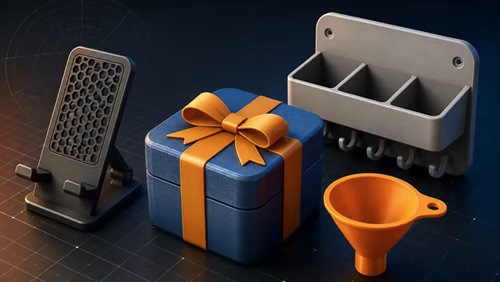 Fusion 360 For Beginners: Design Real-World Products Published 5/2026 MP4 | Video: h264, 1920x1080 | Audio: AAC, 44.1 KHz, 2 Ch Language: English | Duration: 3h 32m | Size: 1.91 GB What you'll learn Design real-world products in Fusion 360 from scratch - even with zero CAD experience Build a portfolio of practical projects including phone stands, funnels, wall-mounted racks, snap-fit boxes, and working hinges Master core Fusion 360 tools: sketching, extrude, revolve, shell, fillet, chamfer, and the timeline Build multi-part assemblies with joints, components, and motion that actually works Create parts that actually fit together using tolerances, clearances, and snap-fit techniques Prepare your designs for 3D printing with the right wall thickness, orientation, and manufacturability checks Use parameters and the timeline to edit your designs quickly without starting over Think like a product designer - not just a software user Requirements No prior CAD or design experience required - this course is built for complete beginners A computer (Windows or Mac) that can run Fusion 360 - most laptops from the last 5 years will work fine A free Fusion 360 license (Autodesk offers free personal-use and student licenses - I'll show you how to get one in the course) Curiosity and a willingness to follow along with the projects - that's really all you need Description Learn Fusion 360 by Designing Real Products - From Day One Most Fusion 360 courses teach you tools. Extrude. Revolve. Fillet. Loft. You learn what every button does - and then you sit in front of a blank canvas, completely stuck, with no idea how to design anything real. This course is different. From the very first project, you'll be designing functional, real-world products in Fusion 360 - even if you've never opened a CAD program in your life. You'll learn the toolsas you need them , in the context of actually building something. By the end, you won't just know Fusion 360 - you'll know how tothink like a product designer. What You'll Build This course is built around hands-on projects you'll design from scratch - Aphone stand that holds your phone at the perfect angle - Awall-mounted rack with clean, manufacturable geometry - Afunnel designed with revolves and section analysis - AnAllen key model for precision practice -Snap-fit storage boxes with working clearances and tolerances - Ahinged assembly with real motion - Acomplete gift box project as your final build - refined, decorated, and entirely yours Every project is designed to be 3D-printable, so you can take what you design in Fusion 360 and turn it into something you can hold in your hand. What You'll Actually Learn Beyond the projects, you'll walk away with skills that apply to anything you design in the future - The core Fusion 360 toolset - sketching, extrude, revolve, shell, fillet, chamfer, and more - Parametric modeling and timeline editing so you can change designs without starting over - Design intent - why parts are built the way they are, not just how - Tolerances, clearances, and snap-fit techniques that make parts actually fit together - How to prepare designs for 3D printing - wall thickness, orientation, manufacturability - Multi-part assemblies with joints, components, and working motion - The mindset of a product designer - how to look at a problem and design your way to a solution Who this course is for Complete beginners who want to learn Fusion 360 by designing real products - not memorizing random tools Hobbyists and makers who want to turn their ideas into physical objects they can 3D print 3D printing enthusiasts who are tired of downloading other people's models and want to design their own Anyone curious about CAD who learns best by building practical projects, step by step H |
| Часовой пояс GMT +3, время: 22:06. |
vBulletin® Version 3.6.8.
Copyright ©2000 - 2026, Jelsoft Enterprises Ltd.
Перевод: zCarot