 Wintousb 10.5 Multilingual
All Editions| Windows x86/x64 | File size: 42.4 MB
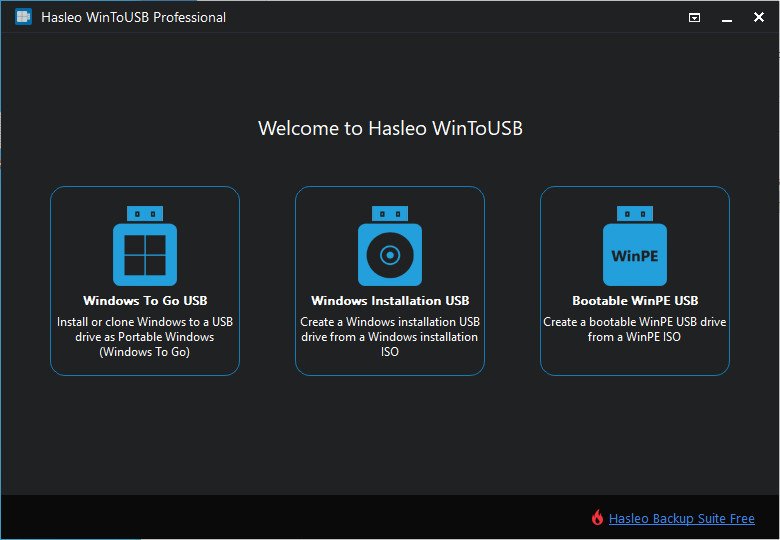
WinToUSB (also called Windows To USB) is the best free Windows To Go (WTG) Creator which allows you to install and run a fully-functional Windows on external hard drive, USB flash drive or Thunderbolt drive. It is so easy and efficient, with just 3 steps and a few minutes, you can create your first portable Windows 11/10/8/7 or Windows Server directly from an ISO, WIM, ESD, SWM, VHD, VHDX file or CD/DVD drive, or you can clone existing Windows installation to USB or Thunderbolt drive as portable Windows. WinToUSB also supports creating Windows installation USB flash drive from Windows 11/10/8/7 and Windows Server installation ISO, with it you can install Windows from the USB flash drive easily.
Features
- Creation of Windows To Go from ISO, WIM, VHD, VHDX or CD/DVD drive.
- Clone Windows 11/10/8/7 to USB/Thunderbolt drive as portable Windows.
- Creation of Windows To Go on Non-Certified Windows To Go USB drive.
- Encrypt Windows To Go with BitLocker to keep your data safe.
- Creation of Windows installation USB flash drive with BIOS & UEFI support.
- Use any edition of Windows 11/10/8/7 and Windows Server 2019/2016/2012/2010 to create Windows To Go USB drive.
- Support for Thunderbolt and non-512 byte sector size drives.
Windows To Go (Portable Windows) Creator
WinToUSB allows you to install & run fully-functional Windows on an external HDD/SSD, USB flash drive or Thunderbolt drive, which means you can carry the portable Windows drive to anywhere and use it on any computer.
- Use any version of Windows 11/10/8/7 and Windows Server to create Windows To Go Workspace
- Creation of Windows To Go from an ISO, WIM, ESD, SWM, VHD(X) image file or CD/DVD drive
- Clone existing Windows installation to USB drive or Thunderbolt drive as portable Windows
- Creation of Windows To Go on Non-Certified Windows To Go drive
- Hot clone Windows without restarting the source computer to be cloned
- Create BitLocker encrypted Windows To Go Workspace
- Support for creating VHD/VHDX-based Windows To Go Workspace
Windows Installation USB Creator
WinToUSB releases a feature called "Windows Installation USB Creator" which allows you to create a Windows installation USB flash drive from a Windows 11/10/8/7/vista/2019/2016/2012/2008 installation ISO file with a few simple steps, with this feature you can create a bootable Windows installation USB drive to install Windows on both Traditional BIOS and UEFI computers by using the same USB drive.
Windows PE Bootable USB Creator
WinToUSB also supports creating a bootable Windows PE USB drive, it can help you transfer the contents of a Windows PE image to a USB drive and make the USB drive bootable






 Wintousb 10.5 Multilingual

