 Editions: Professional / Ultimate
Description: xplorer²
Editions: Professional / Ultimate
Description: xplorer² is a desktop file manager combining the simplicity of windows explorer with the speed and efficiency of traditional dual pane orthodox file managers, helping you be productive with your documents, pictures, music, source code and other files.
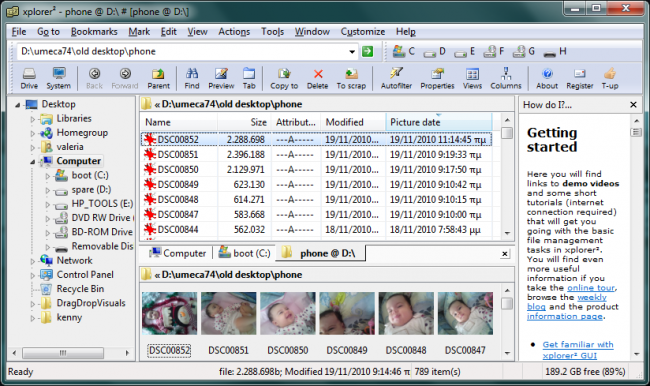 Power at your fingertips:
Full shell namespace browser
Dual panes, folder tabs and Miller columns
Preview documents, images, music etc.
Fast desktop search using all file attributes
Folder sizes and disk space visualization
Synchronize folder contents
Search for duplicate files to free space
Advanced copy, delete and rename operations
Filename color coding and tagging
Execute custom commands (even DOS)
Macros to automate complex file management
Fully customizable
Modern ribbon UI or traditional menu bar
Everyday efficiency and control
Manage large folders with ease
Lightweight system resource use
Native 32/64 bit and Unicode versions
What can this file manager do for me?
Explore
Browse folders everywhere windows explorer can access including network, zipfolders, webfolders, libraries, FTP, cameras, mobile phones, cloud storage etc
Filter & select
Too many documents in a folder? Show only those relevant to your work with a variety of simple wildcards and file property based filters
Search & Locate
xplorer² desktop search engine is unrivalled in power, speed and flexibility. If you can think of the attributes xplorer² will find your files and highlight the search keywords
Manage
Transfer and delete files using filters and overwrite control, even in deep paths. Create links, junctions, add comments/tags, touch dates, split/join, mass rename, shred
Tabs and dual panes
Combine dual-panes with folder tabs and all the usual view modes (thumbnails, details, folder tree etc)
Preview
Quick preview of text, office, PDF, pictures, audio and video files. Internal text editor
Color coding
In addition to icons tell your documents apart using coloring rules on file types and attributes
Export names
Copy folder listings as text for printing and archiving. Full unicode support for localized filename
Cleanup hard disk
Where is my hard disk space wasted? Locate duplicate files and big size folders and clean them up. Find empty folders
Synchronize
Compare single folders or whole disks and synchronize your desktop with your work or laptop computer
Customize
View single or dual panes, unlimited folder tabs, customize toolbars, skins and keyboard shortcuts for all commands.
Launch
Execute user commands and scripts on selected files and folders. Improved DOS console
Shell Integration
All your namespace extensions, column handlers, thumbnails, virtual folders, icon overlays, infotip popups, WLX/WDX/WCX plugins will work as in windows explorer.
Be productive
Browse fast with bookmarks, breadcrumbs, history and autocompletion. Save tons of time with small innovative details (e.g mirror browsing)
Release Name: xplorer2 v6.3.0.1
Size: 15.4 MB






 Xplorer2 V6.3.0.1

