 Description: Ankh Tech Windows Boot
 is the Most Superior Windows Boot, With It's Multi functionality and the Number of Professional Programs it Contains and It's Ability To install Any Windows (10 , 11 , 7 , 8), with no Requirements at all on Any PC or Laptop It Could Overpower any other Windows Boot easily. These are the Boots Used in all Our Modified ISOs.
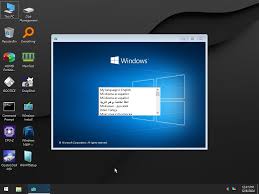
Simple and Easy Interface
Ankh Tech Windows Boot has a very Similar interface to a Normal Windows
With Start menu and File Explorer (This PC)
You will Have no problem Navigating Your PC/Laptop before you Install the Windows
It can even be Used as a WinPE because in Reality it's a WinPE
It's Provided To Replace the Boring Microsoft Windows Boot,
Which is a Dull Empty Blue Screen, With only The Windows Installation Window
3 Boots Different in Size for Best Compatibility on Different Hardware varieties the Difference in Size and Hardware compatibility , Makes it more ideal for usage in different scenarios
Ankh Tech Windows Boot
Best Suited for New Hardware
Contains the most Needed Programs
Supports Old and New Hardware
Ankh Tech Windows Boot Lite
Best Suited for Medium and Low and Hardware
Contains enough Programs for Basic Usage
Could Support New Hardware
Ankh Tech Windows Boot SuperLite
Best Suited for Low End hardware
Contains the least amount of programs
Can't Support New Hardware
How to Use
Any Microsoft Windows ISO (Windows 10 , 11 , 7 , 8) Contains a File Named "Install.wim" or "Install.esd"
All you have to do is : -
1 - Burn Ankh Tech Windows Boot on Your USB Flash Drive Using Rufus
2 - Open Your USB Flash Drive and go to Folder "Sources"
3 - Open any Microsoft Windows ISO (Modified or Original) Using 7-Zip and go to Folder Sources
, and Take out the file "Install.wim" or "Install.esd" and place it in the Folder "Sources" in Your USB Flash Drive
4 - Now Restart Your PC and Boot from Your USB Flash Drive , You will be in Ankh Tech Windows Boot
5 - When you Proceed With the Windows Installation Steps , You will see all Languages , You Must Choose the Language of the Windows you Installing
Which is The Language of the Microsoft Windows ISO You Took the File "Install.wim" from it
it's Important You Choose the Right Language or installation will Fail , Don't Choose a Language that is not added in the Original Microsoft Windows ISO
Release Name: Ankh Tech Windows Boot v3.0
Size: 836 MB






 Ankh Tech Windows Boot V3.0

