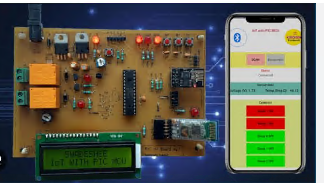
Hardware Design Using Pic Microcontroller
Last updated 5/2025
Created by Eshanav Systems
MP4 | Video: h264, 1280x720 | Audio: AAC, 44.1 KHz, 2 Ch
Level: Beginner | Genre: eLearning | Language: English + subtitle | Duration: 35 Lectures ( 5h 55m ) | Size: 3.83 GB
✓ PCB design for PIC MCU for IoT
✓ PIC programming using C and XC8 Compiler
✓ Hardware Prototyping and DIY
✓ Building & Testing circuits
Requirements
● No programming experience needed. You will learn everything you need to know
● Laptop with KiCAD & MPLAB IDE software- available for free download
● Internet connection for Android app development and testing IoT projects
Description
This course is special for me for a few reasons. Having already published a few courses on PIC microcontrollers, PCB Design and PIC32 MCU with more than 5500 students registered for my courses, I was getting a feeling that my courses are incomplete. I wanted to prepare a course that covers both hardware design and firmware development. This course is the outcome of all the inputs and experiences I gained from my previous courses and my professional experience.
This course covers the following items as you can see from the course curriculum
• PCB Design and prototype development
• PIC programming from basics to advanced concepts
The first section is an introduction to PIC MCUs and the tools you need to install for the course. You will get a list of components required for the hardware development.
In the second section, you will get all the knowledge required to design your own hardware based on PIC MCU. You will be able to design a PCB on KiCAD and then produce a DIY PCB using a simple etching process. You will know how to solder the components on the PCB and then test the hardware by using the test code provided by me.
In the third section, you will understand how to write a simple LED blink code using MPLABX IDE and XC8 C compiler. You will know how to interface switches using external interrupts and LCD display with the PIC MCU. You will know how to use the peripheral pin select feature to map PIC peripheral feature with the possible set of pins.
After getting a hold of PIC basics, you will understand timers, PWM modules, watchdog timer, Analog to Digital Converter and UART modules to meet advanced project requirements in the fourth section
Who this course is for
■ Beginners, Engineers and DIY enthuasists






 Hardware Design Using Pic Microcontroller

