 Release Name:
 DS SIMULIA CST Studio Suite 2026 SP1
Size: 8.16 GB
DS SIMULIA CST Studio is a high-performance 3D EM analysis software package for designing, analyzing and optimizing electromagnetic (EM) components and systems.
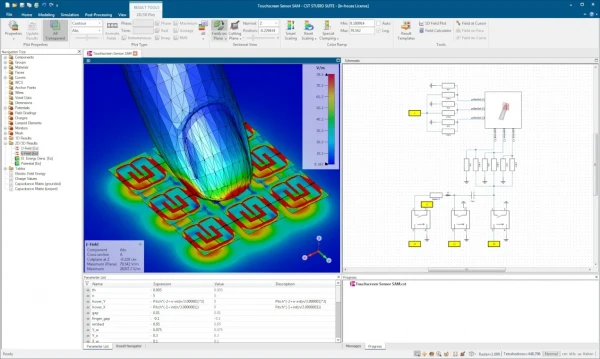 DS SIMULIA CST Studio Suite Features
• Comprehensive 3D electromagnetic simulation and analysis platform
• Solves high-frequency, low-frequency, and static electromagnetic problems
• Accurate simulation of antennas, RF components, and microwave devices
• Time-domain, frequency-domain, and integral equation solvers included
• Advanced modeling for EMC/EMI, signal integrity, and power integrity
• Supports radar, wireless communication, and IoT system design
• Detailed analysis of cables, connectors, and PCB layouts
• Multiphysics coupling for thermal and mechanical effects
• Parametric studies and optimization for design refinement
• High-performance computing support for large and complex models
• CAD import and native geometry modeling tools
• Visualization of field distributions, currents, and radiation patterns
• Automated meshing for improved accuracy and speed
• Template-based workflows for faster setup
• Compliance testing support for industry standards
• Scales from component-level to full-system simulations
• Integrates with SIMULIA and Dassault Systèmes ecosystem
• Reduces prototyping costs through virtual validation
• Widely used in aerospace, automotive, electronics, and telecom industries
• Enables early detection of electromagnetic performance issues
Installation
- Install DS SIMULIA CST Studio Suite 2026
( ..\CST Studio Suite 2026\setup.exe )
After installation is complete, uncheck the box next to "Configure licensing for .".
- Install the SP1 update
: Start > CST Studio Suite 2026 > CST Update Manager 2026 > Import > CST_S2_v2026_WIN_SP1_2025-08-29_2025-10-22.sup > select SP1 > Install
- Copy and replace the contents of the "CST_Studio_Suite_2026_PatchFiles.zip" archive into the folder with the installed program
. By default, c:\Program Files\CST Studio Suite 2026
- In the "license.dat" file, replace with the MAC address of the network device.
(c:\Program Files\CST Studio Suite 2026\license.dat) Where to get the MAC address: run LMTOOLS Utility > "System Settings" tab > "Ethernet" field
(c:\Program Files\CST Studio Suite 2026\License Manager\lmtools.exe) Example:
was - SERVER this_host 27075
now - SERVER this_host 080027934f94 27075
- Start > CST Studio Suite 2026 > CST License Manager 2026 > Start Service
default port: 27075
- Start > CST Studio Suite 2026 > CST Studio Suite 2026 > License > License.
select "Point to an existing Flexnet-based."
enter text in the corresponding fields "Server: localhost" and "Port: 27075"
click Ok
- Start > CST Studio Suite 2026 > CST Studio Suite 2026 > Options > Automatic Updates > Update Mode: No Automatic Updates
Warning: After installing the update, no further treatment is required.






 Ds Simulia Cst Studio Suite 2026 Sp1

